Overview
MOMO AI provides a unified API proxy service. You can call any published agent through https://hub.momoai.pro/api/agent-proxy. This endpoint is the most flexible and complete way to call agents, supporting multiple parameter passing methods and advanced features.
Preparation
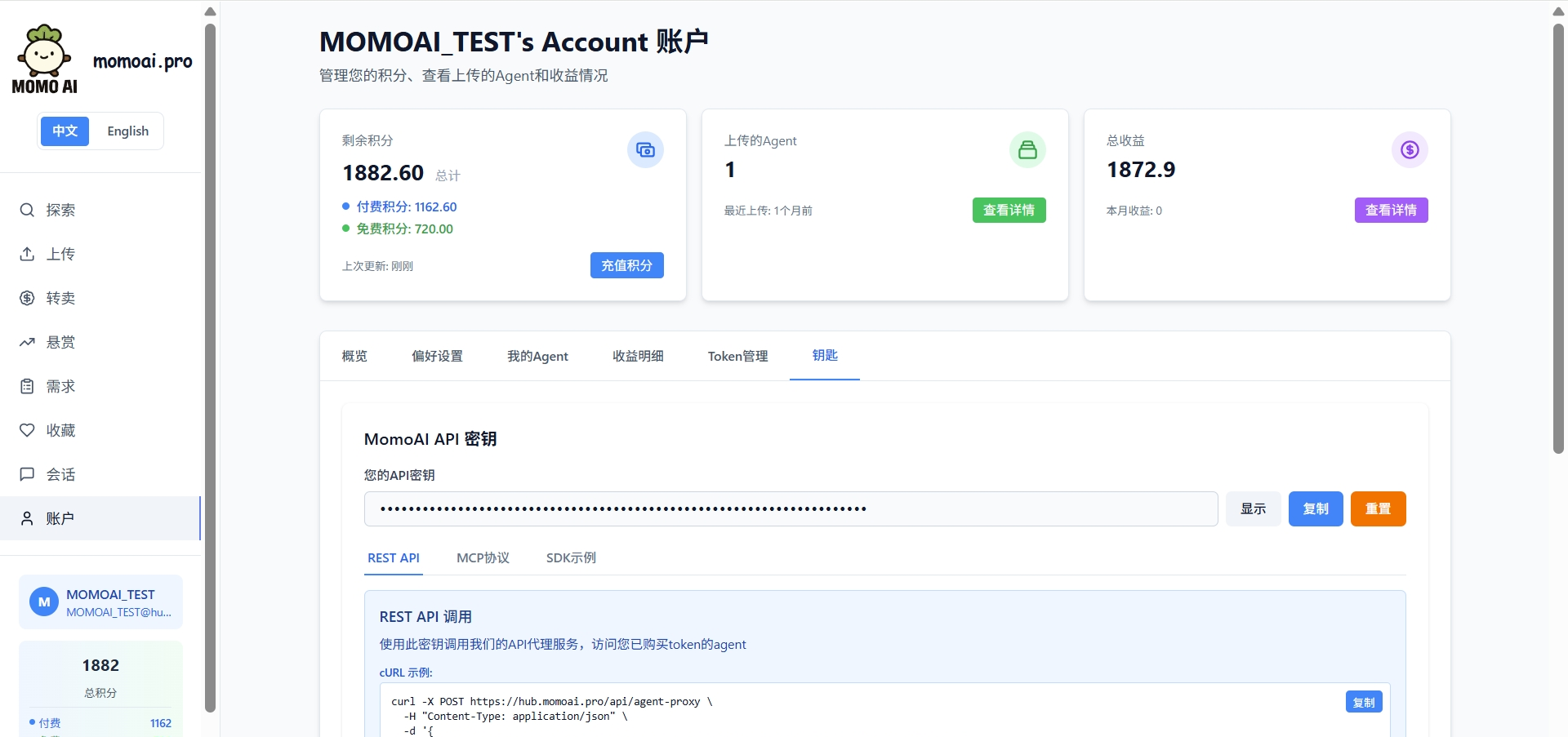
Getting an API Key
After registering and logging into your MOMO AI account, go to Account → Keys page to obtain your API key. This key is your authentication credential for API calls. Please keep it safe.
Querying Agent ID
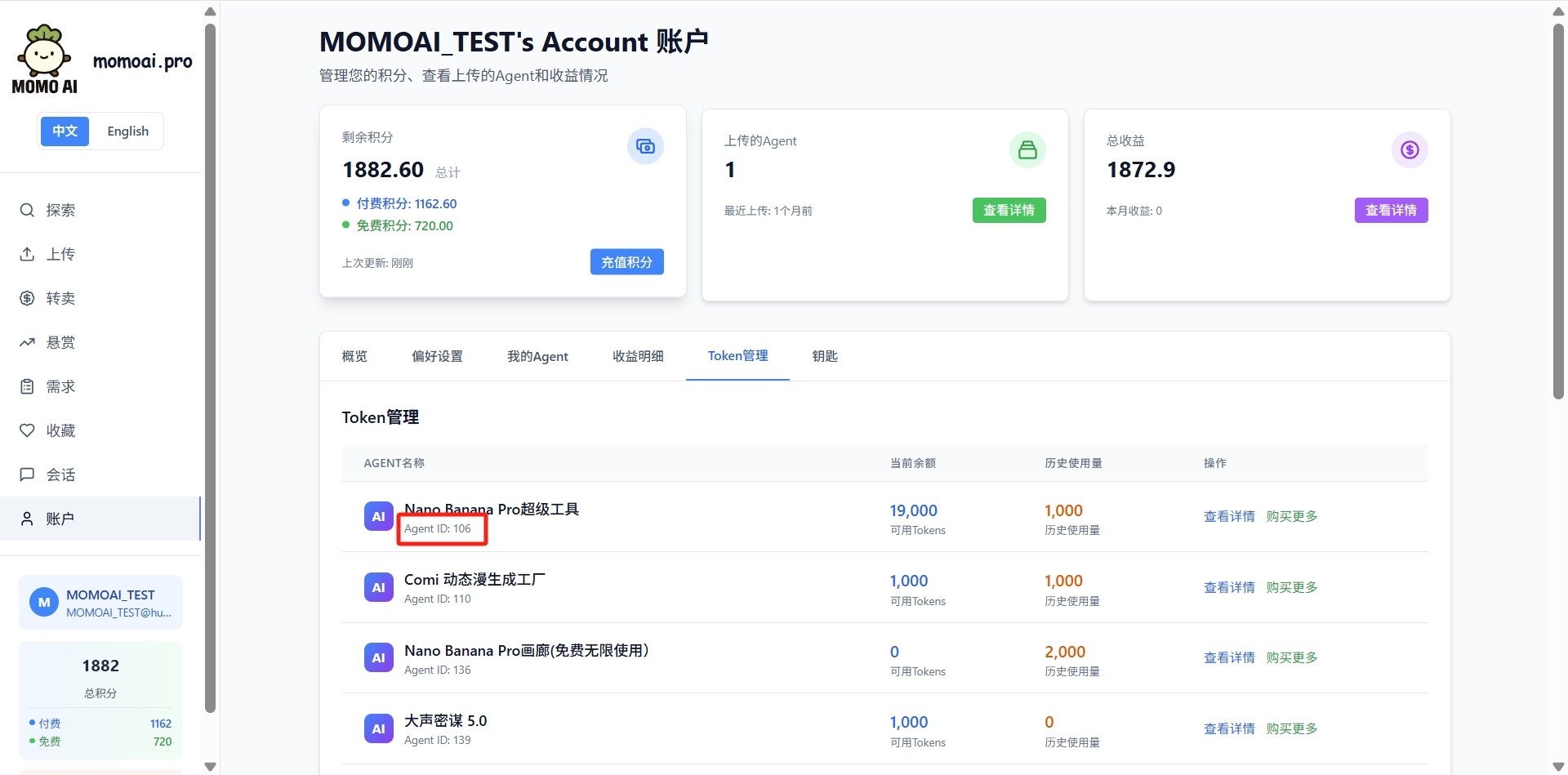
Go to Token Management page to view the agent number (Agent ID) you need to call. This number is used to specify the target agent in API calls.
Core Endpoint
POST /api/agent-proxy
This is the most core API endpoint of MOMO AI, providing the most complete calling method and maximum flexibility.
Request URL:
POST https://hub.momoai.pro/api/agent-proxy
Specifying an Agent
The agent_id can be specified in any of the following ways:
| Method | Example | Description |
|---|---|---|
Request body agent_id | {"agent_id": 162, ...} | Directly specify numeric ID |
Request body model | {"model": "momo_162", ...} | Extract from model name |
| URL query parameter | /api/agent-proxy?agentid=162 | RESTful style |
Request Body Parameters:
| Parameter | Type | Required | Description |
|---|---|---|---|
user_momoai_key | string | Yes* | API key (Authorization header also works) |
agent_id | number/string | Yes* | Agent number |
model | string | Yes* | Model name, format momo_{agent_id}[_{suffix}] |
messages | array | Yes | Message array |
stream | boolean | No | Enable streaming response |
__anthropic_passthrough | boolean | No | Preserve Anthropic tool call format |
__return_raw | boolean | No | Return raw response format |
*Either agent_id or model is required; either user_momoai_key or Authorization header is required.
API Key Passing Methods
Method 1: Request Body
{
  "user_momoai_key": "YOUR_API_KEY",
  "agent_id": 162,
  "messages": [{"role": "user", "content": "Hello"}]
}
Method 2: Authorization Header
Authorization: Bearer YOUR_API_KEY
Request Examples
Basic Call:
curl -X POST "https://hub.momoai.pro/api/agent-proxy" \
  -H "Content-Type: application/json" \
  -H "Authorization: Bearer YOUR_API_KEY" \
  -d '{
    "agent_id": 162,
    "messages": [
      { "role": "user", "content": "Please introduce yourself" }
    ],
    "temperature": 0.7,
    "max_tokens": 1000
  }'
Using Model Name to Specify Agent:
curl -X POST "https://hub.momoai.pro/api/agent-proxy" \
  -H "Content-Type: application/json" \
  -H "Authorization: Bearer YOUR_API_KEY" \
  -d '{
    "model": "momo_162_claude",
    "messages": [
      { "role": "user", "content": "Hello, please introduce your capabilities" }
    ]
  }'
Using URL Query Parameters:
curl -X POST "https://hub.momoai.pro/api/agent-proxy?agentid=162" \
  -H "Content-Type: application/json" \
  -H "Authorization: Bearer YOUR_API_KEY" \
  -d '{
    "messages": [
      { "role": "user", "content": "Tell me a joke" }
    ]
  }'
Response Format
{
  "success": true,
  "data": {
    "id": "chatcmpl-abc123",
    "object": "chat.completion",
    "created": 1699000000,
    "model": "momo_162",
    "choices": [
      {
        "index": 0,
        "message": {
          "role": "assistant",
          "content": "Hello! I am..."
        },
        "finish_reason": "stop"
      }
    ],
    "usage": {
      "prompt_tokens": 15,
      "completion_tokens": 50,
      "total_tokens": 65
    }
  },
  "usage": {
    "tokens_used": 65
  }
}
Streaming Response
const response = await fetch('https://hub.momoai.pro/api/agent-proxy', {
  method: 'POST',
  headers: {
    'Content-Type': 'application/json',
    'Authorization': 'Bearer YOUR_API_KEY'
  },
  body: JSON.stringify({
    agent_id: 162,
    messages: [{ role: 'user', content: 'Write a poem about spring' }],
    stream: true
  })
});

const reader = response.body.getReader();
const decoder = new TextDecoder();

while (true) {
  const { done, value } = await reader.read();
  if (done) break;

  const chunk = decoder.decode(value);
  console.log(chunk);
}
Compatible Endpoints
In addition to the core endpoint, MOMO AI also provides API endpoints compatible with mainstream SDKs.
OpenAI Compatible Endpoint (/v1/chat/completions)
Suitable for OpenAI SDK and all libraries compatible with OpenAI format.
Request URL:
POST https://hub.momoai.pro/v1/chat/completions
Example:
import OpenAI from 'openai';

const client = new OpenAI({
  apiKey: 'YOUR_API_KEY',
  baseURL: 'https://hub.momoai.pro/v1'
});

const response = await client.chat.completions.create({
  model: 'momo_162',  // Must start with momo_
  messages: [
    { role: 'system', content: 'You are a helpful assistant.' },
    { role: 'user', content: 'Please introduce yourself.' }
  ]
});

console.log(response.choices[0].message.content);
Anthropic Compatible Endpoint (/v1/messages)
Suitable for Claude SDK and Anthropic official library, supporting preservation of complete tool call format.
Request URL:
POST https://hub.momoai.pro/v1/messages
Example:
import Anthropic from '@anthropic-ai/sdk';

const client = new Anthropic({
  apiKey: 'YOUR_API_KEY',
  baseURL: 'https://hub.momoai.pro/v1'
});

const response = await client.messages.create({
  model: 'momo_162',
  max_tokens: 1024,
  messages: [
    { role: 'user', content: 'Please introduce yourself.' }
  ]
});

console.log(response.content[0].text);
Model Naming Conventions
Format Description
All requests must use the following format to specify the target agent:
momo_{agent_id}[_{optional_suffix}]
{agent_id}: Required, the agent number you queried on the MOMO AI platform{optional_suffix}: Optional, a custom name for your local identification and management
Naming Examples
| Model Name | Agent ID | Description |
|---|---|---|
momo_58 | 58 | Directly use agent number |
momo_162 | 162 | Directly use agent number |
momo_162_claude | 162 | With suffix for easy identification |
momo_53_mimo | 53 | With suffix for easy identification |
Important: Model names must start with momo_ followed by the numeric Agent ID. Requests that do not conform to this format will be rejected.
Request Parameter Details
Common Parameters
| Parameter | Type | Default | Description |
|---|---|---|---|
messages | array | Required | Message array, each containing role and content |
temperature | number | 1.0 | Sampling temperature, range 0-2, higher is more random |
max_tokens | number | - | Maximum number of tokens to generate |
top_p | number | 1.0 | Nucleus sampling parameter |
stream | boolean | false | Enable streaming response |
tools | array | - | Function tool definitions (OpenAI format) |
Message Format
{
  "model": "momo_162",
  "messages": [
    {
      "role": "system",
      "content": "You are a professional data analyst."
    },
    {
      "role": "user",
      "content": "Please explain what machine learning is?"
    },
    {
      "role": "assistant",
      "content": "Machine learning is a branch of artificial intelligence..."
    },
    {
      "role": "user",
      "content": "What about deep learning?"
    }
  ]
}
Advanced Features
Anthropic Passthrough Mode
When you need to preserve the complete Anthropic tool call format (such as tool_use and tool_result blocks), you can use the __anthropic_passthrough parameter:
{
  "agent_id": 162,
  "messages": [...],
  "__anthropic_passthrough": true,
  "__return_raw": true
}
This mode is suitable for scenarios requiring precise control of tool call flow.
Function Calling
OpenAI Format:
const response = await fetch('https://hub.momoai.pro/api/agent-proxy', {
  method: 'POST',
  headers: {
    'Content-Type': 'application/json',
    'Authorization': 'Bearer YOUR_API_KEY'
  },
  body: JSON.stringify({
    agent_id: 162,
    messages: [
      { role: 'user', content: 'What time is it now?' }
    ],
    tools: [
      {
        type: 'function',
        function: {
          name: 'get_current_time',
          description: 'Get current time',
          parameters: {
            type: 'object',
            properties: {}
          }
        }
      }
    ]
  })
});
Complete Call Examples
cURL Method
Non-streaming Request:
curl -X POST "https://hub.momoai.pro/api/agent-proxy" \
  -H "Content-Type: application/json" \
  -H "Authorization: Bearer YOUR_API_KEY" \
  -d '{
    "agent_id": 162,
    "messages": [
      { "role": "user", "content": "Hello, please introduce yourself" }
    ],
    "temperature": 0.7,
    "max_tokens": 500
  }'
Streaming Request:
curl -X POST "https://hub.momoai.pro/api/agent-proxy" \
  -H "Content-Type: application/json" \
  -H "Authorization: Bearer YOUR_API_KEY" \
  -d '{
    "agent_id": 162,
    "messages": [
      { "role": "user", "content": "Tell me a joke" }
    ],
    "stream": true
  }'
Python Method
import requests

API_KEY = "YOUR_API_KEY"
AGENT_ID = 162

headers = {
    "Content-Type": "application/json",
    "Authorization": f"Bearer {API_KEY}"
}

data = {
    "agent_id": AGENT_ID,
    "messages": [
        {"role": "system", "content": "You are a fun assistant"},
        {"role": "user", "content": "Tell me a joke"}
    ],
    "temperature": 0.8,
    "max_tokens": 500
}

# Non-streaming call
response = requests.post(
    "https://hub.momoai.pro/api/agent-proxy",
    headers=headers,
    json=data
)

result = response.json()
print(result["data"]["choices"][0]["message"]["content"])

# Streaming call
data["stream"] = True
response = requests.post(
    "https://hub.momoai.pro/api/agent-proxy",
    headers=headers,
    json=data,
    stream=True
)

for line in response.iter_lines():
    if line:
        print(line.decode('utf-8'))
Node.js Method
const fetch = require('node-fetch');

async function callAgent() {
  const response = await fetch('https://hub.momoai.pro/api/agent-proxy', {
    method: 'POST',
    headers: {
      'Content-Type': 'application/json',
      'Authorization': 'Bearer YOUR_API_KEY'
    },
    body: JSON.stringify({
      agent_id: 162,
      messages: [
        { role: 'user', content: 'Introduce yourself in 50 words' }
      ],
      temperature: 0.7,
      max_tokens: 100
    })
  });

  const result = await response.json();
  console.log(result.data.choices[0].message.content);
}

callAgent();
Error Handling
Common Error Codes
| HTTP Status Code | Error Type | Description |
|---|---|---|
| 400 | invalid_request_error | Request parameter error, such as incorrect model format or missing required parameters |
| 401 | invalid_api_key | Invalid or missing API key |
| 403 | insufficient_balance | Insufficient balance, please purchase tokens |
| 404 | agent_not_found | Specified agent does not exist |
| 429 | rate_limit_error | Request frequency exceeded, maximum 10 concurrent streaming connections |
| 500 | api_error | Server internal error |
Error Response Example
{
  "error": "Invalid model format. Expected: momo_{{agent_id}} or momo_{{agent_id}}_{{suffix}}, got: claude-sonnet"
}
Error Handling Example
try {
  const response = await fetch('https://hub.momoai.pro/api/agent-proxy', {
    method: 'POST',
    headers: {
      'Content-Type': 'application/json',
      'Authorization': 'Bearer YOUR_API_KEY'
    },
    body: JSON.stringify({
      agent_id: 162,
      messages: [{ role: 'user', content: 'Hello' }]
    })
  });

  if (!response.ok) {
    const error = await response.json();
    throw new Error(error.error || `HTTP ${response.status}`);
  }

  const result = await response.json();
  console.log(result.data.choices[0].message.content);
} catch (error) {
  if (error.message.includes('401')) {
    console.error('Invalid API key, please check and retry');
  } else if (error.message.includes('403')) {
    console.error('Insufficient balance, please recharge');
  } else if (error.message.includes('429')) {
    console.error('Too many requests, please try again later');
  } else {
    console.error('Request failed:', error.message);
  }
}
Usage Limits
- Concurrent Connections: Maximum 10 concurrent streaming requests per user
- Request Frequency: Please refer to your account plan limits
- Token Consumption: Each API call consumes tokens from your account balance
Notes
- Model names must start with
momo_: This is the identifier prefix for MOMO AI agents - Agent ID must be correct: Please confirm the agent number you want to call on the MOMO AI platform
- API key security: Do not hardcode API keys in client code, manage through environment variables or secure configuration
- Balance management: API calls consume token balance, ensure sufficient balance before calling
- Tool calls: Use
__anthropic_passthroughto preserve complete Anthropic tool call format
Endpoint Comparison
| Feature | /api/agent-proxy | /v1/chat/completions | /v1/messages |
|---|---|---|---|
| Flexibility | Highest | High | High |
| SDK Compatibility | Generic HTTP | OpenAI | Anthropic |
| Tool Call Format | OpenAI / Anthropic | OpenAI | Anthropic |
| Passthrough Mode | Supported | Not Supported | Not Supported |
| Recommended Scenarios | Advanced usage, custom needs | Standard OpenAI integration | Claude SDK integration |
FAQ
Q: How to specify different agents?
A: Through the agent_id parameter or the Agent ID in the model name. For example, momo_58 calls agent 58, momo_162 calls agent 162.
Q: Does it support function calling?
A: Yes. The agent-proxy endpoint supports OpenAI format tool definitions and automatically converts them to the format required by the backend agent.
Q: How to view my API call history and usage? A: Log in to the MOMO AI platform, go to the Account page to view detailed usage records and token balance.
Q: Which of the three endpoints should I use? A:
/api/agent-proxy: Most complete features, suitable for advanced scenarios/v1/chat/completions: Most convenient if you use OpenAI SDK/v1/messages: If you use Claude SDK or need to preserve Anthropic format
Q: What if the request fails? A: First check if the API key is correct, then confirm if the Agent ID is valid, and finally check the specific explanation in the error message. Contact technical support if you have questions.
Technical Support
If you have any questions, please contact MOMO AI official:
- Email: partnership@momoai.wecom.work
- Business: 13716105018
- Technical Support: 13815831618